Blog Feed

How a HDMI Cable Works

HDMI stands for High-Definition Multimedia Interface, a standard for connecting high-definition devices by providing a universal connection capable of combining audio and video signals into a single interface.

The technology was developed at the beginning of the millennium and launched in 2003. The basic principle behind it is very similar to that of DVI cables, that of transmitting data between two devices, the most important difference being that DVI cables can transmit only video signals, while HDMI cables can transmit audio as well. HDMI cables link devices through the respective ports on each device. Most devices used today carry the necessary ports, but there is a solution for the ones that don’t as well: small HDMI adaptors are available for being plugged into DVI ports, making the connection of the cable possible.
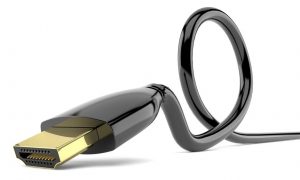
long HDMI cable

A long HDMI cable is very useful in a number of situations, most notably for setting up AV systems. As the cable supports audio and video signals as well, it eliminates the need to use two separate cables (one for audio and one for video), reducing the size of entangled cable bundles in the home. The cable also enhances the quality of the signals transmitted, so the images that you will see and the sound that you will hear as the result of the transmission will be the best you can get.

First Posted here: How a HDMI Cable Works
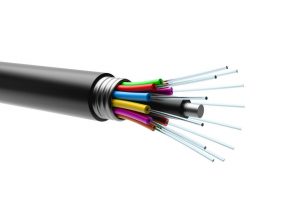
What Does Fiber Optic Cable Do?

A fiber optic cable is a special type of cable used for computerized and other digital networks, especially for telecommunication and data networks. The cables consist of multiple strands of very thin glass fibers (usually so thin that they are invisible to the naked human eye or are of the thickness of human hair) encapsulated in special casing and they are, in most cases, installed into the ground.

Fiber Optic CableFiber optic cables contain very thin fibers, but even so, the fibers consist of multiple layers. There are two types of fiber optic cable used today: single mode cables that use laser to generate the light that travels through the cable and multi-mode optical fiber cables that use LEDs for the same purpose.

Fiber optic cables are used extensively, being the cable solutions used for much of the world’s internet, telephone and cable television systems. They are the most advanced solutions used today, offering performance that is superior to wired cables in terms of bandwidth as well as data transmission quality. Fiber optic cables are suitable for transmitting data over very long distances with minimum or no loss and their special construction ensure that they are not as sensitive to interference with other cables as standard, wired cables.

Original Post here: What Does Fiber Optic Cable Do?

Things You Should Know about the Function of a HDMI Cable

The abbreviation HDMI stands for High-Definition Multimedia Interface, a technology used for transmitting uncompressed video data and compressed or uncompressed digital audio data to a computer monitor, a digital audio device or television compatible with the protocol from a HDMI device. To be able to transmit the data between the two types of devices, a cable is needed. The role of the cable is to transmit video and the audio signal without loss or with as little loss as possible.

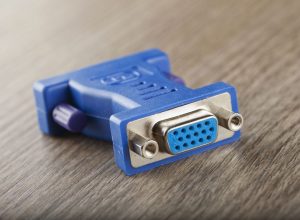
The HDMI cables used for connecting the two different types of devices can be connected only one way – the plugs on each end of the cable fit only one way. In case one of the devices does not have a suitable output, a HDMI adapter will be needed – the small adapter attaches to the VGA or DVI connection on one device (the older one, probably) to allow for the cable to be connected. Once plugged, the cable makes the connection without requiring the user to install any driver on any of the devices connected and ensures the transmission of the desired signals between the devices. However, most adapters support only video signals, so if you need to transmit audio signals, too, you will probably need to find a different solution.

You can find more information regarding hdmi connectivity and cable functions at https://iec.net/.

IEC

Original Post here: Things You Should Know about the Function of a HDMI Cable

What Is VGA?


vga cable

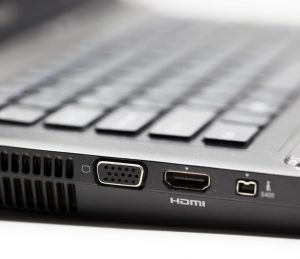
VGA is an abbreviation and it stands for Video Graphics Array, a type of standard interface or connection consisting of specialized ports, cables and connectors between video devices, such as projectors and monitors. The ports and cables used for setting up a VGA connection have a recognizable appearance: the plug at the end of the cable has 15 pins, arranged into three rows, while the port on the device to be connected has 15 pin holes to accommodate the cable’s pins. However, certain applications have ports that consist of pins – for these applications, cables with pin holes are available.

The VGA standard was developed by IBM and it was launched in 1987. The interface is very widespread today – even the latest computers and other types of digital devices are fitted with VGA cable outputs. However, video technology has advanced a lot since the late 1980’s, new formats, standards and interfaces have been introduced since then, which means that communication between VGA and other standards became necessary. The problem can be solved simply, with the help of a cable that converts the signals used by the VGA device to the forms that can be interpreted by high-definition multimedia interfaces (HDMI) without losing data or compromising data quality.

First Seen right here: What Is VGA?

Solving Situations that Call for Converting VGA to HDMI

Modern video technology is advancing quickly, yet in some situations, it might be necessary to convert analog, VGA signal to other formats, such as HDMI.

The abbreviation VGA stands for Video Graphics Adapter or Video Graphics Array and it refers to a standard developed and launched by IBM in 1987 to provide color display screens that deliver a resolution of 640 x 480 a refresh rate of 60 Hz. The vga cable technology uses analog signals, therefore it is capable of delivering lower resolution and only 16 colors at a time.

vga to hdmi

The situations that require conversion to formats suitable for more modern devices, such as HDMI (High-Definition Multimedia Interfaces) units include cases when an older monitor needs to be connected to a newer device and data needs to be transmitted between the two. Fortunately, the issue can be solved simply, by connecting the monitor and the device with a simple VGA to HDMI cable. Most devices today have outputs suitable for such cables, so one end of the cable goes into the VGA device, while the other one is inserted into the HDMI device. The data is then safely converted and transmitted through the cable, in most cases without requiring the installation of a driver on any of the devices connected.


First Seen right here: Solving Situations that Call for Converting VGA to HDMI

How to Set Up a Home Office

Freelancing and telecommuting is becoming increasingly popular and many companies today allow their employees to work from home, too, so the number of people looking for ways to set up a comfortable and efficient home office is growing as the day goes by. Making sure that your home office has everything you need and is also a healthy work environment can be a daunting task, so here are some tips to make the process easier:

  • Evaluate your needs – the items that you need in your office setup depend on your business activities, but you will probably need a desk for your computer, a comfortable and ergonomic chair, a printer with a scanner and standard office supply, such as printing paper, a stapler and a puncher, document trays, folders, maybe even a filing cabinet.
  • consider using space saving TV wall brackets to mount your tv or monitor
  • Consider using space saving TV wall brackets to hang your monitor or TV.
  • Choose the space right – try to pick a quiet area in the house, an area that gets as much natural light as possible. If you will meet clients in your home office, it might be a good idea to have an entire room for your business, preferably one close to the entrance;
  • Protect your eyes – choosing the lighting that goes into your home office is essential for your health, so make decisions about the ideal light color and create layered lighting, with a central light source, a desk lamp and other task lights.

Article Source over here: How to Set Up a Home Office

Conference Room Technology Trends

conference room audio video solutions

Conference room meetings today are no longer attended only by those who are physically present at the venue at the time of the meetings and are no longer conducted only with the help of printed materials. Modern technology has transformed the way we think and conduct meetings – today, most meetings are attended by coworkers who are thousands of miles away from the actual conference room and technology also makes it possible to have collaborative meetings. Here are some of the tech features that are likely to be used in every meeting room in the future:

  • Video conferencing options – the modern conference room audio video solutions that allow everyone on both ends of the conference call to see everyone else encourage everyone to contribute their own input and improves the efficiency of the communication process, therefore they are increasingly used by small and large companies alike;
  • Solid internet connection – this is more of a requirement than a trend nowadays and available in most conference rooms already;
  • Interactive whiteboards – the device became popular as a teaching instrument, but it is nowadays increasingly used by companies to make sure the drafts and drawings sketched during meetings are instantly recorded and made available in a digital format suitable for being distributed.

Originally Posted right here: Conference Room Technology Trends

What Do Custom Cable Manufacturers Do?

Custom cables are nowadays used in many companies for many purposes – whenever two electrical or digital devices need to be connected and their features do not allow for the usage of standard cables, either because of the special needs regarding the data to be transmitted between the two ends or because of the shape, size and technical features of the outputs, custom-made cables are used for the connection.

custom cables design teamThe process of getting custom cables is complex and involves more than simply providing the manufacturer with the specifications, then getting the cables. The process usually involves close collaboration between the client’s product development and custom cables design teams and the cable manufacturer experts to determine the most suitable material and configuration for the cables. A custom cables manufacturer will pay special attention to quality assurance and testing, so the process of getting the right cables will involve a testing phase, too.
Some examples of the fields that need custom cables include the industrial applications that need special communication interfaces to connect unique machines and the testers used to diagnose motorized vehicles and require special communication cables between the computer on which the tester software is run and the computer of the vehicle that is being tested.

First Seen here: What Do Custom Cable Manufacturers Do?

Types of HDMI Connectors

HDMI cable connectors

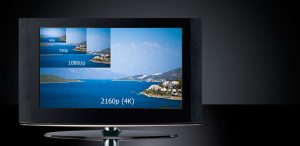
A HDMI cable transmits audio and video signals, making it simple to connect an entire system. The latest generation of cables offer greater durability, support for all forms of 4K Ultra HD (2160p), and additional features such as built-in Ethernet technology. These high-speed cables are retro-compatible.

There are five sorts of connector utilized with HDMI. Type A and B are the most common connectors and have been launched with the initial standard. Since then, type C, D and E have been introduced to meet specific needs.

HDMI Type A connector:    13.9 mm × 4.45 mm (male connector) and f 14 mm × 4.55 mm (female connector)

HDMI Type B connector:   21.2 mm × 4.45 mm; 29 pins

HDMI Type C connector: 10.42 mm × 2.42 mm; 19 pins

HDMI Type D connector:   6.4 mm × 2.8 mm; 19 pins

HDMI Type E connector:   This was introduced with HDMI Version 1.4. and was designed for automotive applications.

The assortment of HDMI cable connectors guarantees that the HDMI standard can be effectively utilized in many distinctive ways and they can accommodate the prerequisites of users of the numerous applications for which HDMI is utilized.

First Posted over here: Types of HDMI Connectors

Different Types of HDMI cables

4K hdmi cable tv resolution

High Definition Multimedia Interface is the current standard for HD video playback. Capable of storing HD videos with surround sound, EDID handshaking signals, Ethernet and IR signals through a single cable, HDMI has consolidated its position within the industry as a standard for easy and efficient playback of high definition video files.

  • There are several versions of HDMI cables:
  • HDMI 1.0
  • HDMI 1.1
  • HDMI 1.2
  • HDMI 1.2a
  • HDMI 1.3
  • HDMI 1.4

HDMI 1.4 cables represent the most advanced technology present on the market today, offering compatibility with the devices that have included the latest features. HDMI 1.4 added the following features to previous versions:

  • Ethernet channel that supports 100 Mbit/ s (HEC)
  • 4K x 2K Resolution (ie 3840 × 2160p)
  • 3D support
  • Audio return channel

In addition to the version and standard of a HDMI cable, we must also pay attention to its type. There are four types of HDMI cables:

  • HDMI standard
  • High Speed ​​HDMI
  • Standard HDMI with Ethernet
  • High Speed ​​HDMI with Ethernet

Regardless of the HDMI version you choose, it ensures compatibility with previous versions and allows the transmission of digital signals between the connected equipment. However, a proper choice of the type of HDMI cable allows it to adapt its functionality to the individual requirements of the user.

For example, if the HDMI cable must also transmit data packets to the Ethernet standard, we must choose a Standard HDMI cable with Ethernet or High Speed ​​4K HDMI cable with Ethernet.


First Posted right here: Different Types of HDMI cables

Design a site like this with WordPress.com
Get started