Blog Feed

The Most Common Types of Monitor Ports


A monitor port is a port used for connecting a computer to a monitor to display the output of the computer. The two principal types of connection between the two units are analog and digital. The previous type of connection is an older communication protocol, but the ports needed for it are still provided on many computers. Here are the most common ports available for connecting computers and monitors today:

  • DVI – the abbreviation stands for “Digital Visual Interface” and it is a port that allows for transmitting video data in uncompressed form;
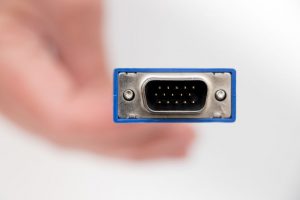
VGA Cable

  • VGA – the acronym for Video Graphics Array, VGA cable is used for analog signals, especially for connecting to video cards. VGA cables have 15 pins arranged in three rows, so VGA ports have the same number and arrangement of pin holes;
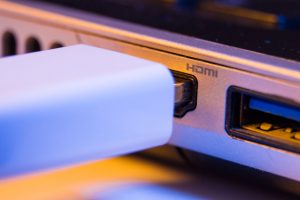
  • HDMI – high-definition multimedia interface ports are for transmitting uncompressed digital audio and video data and they are the latest and most commonly available ports today;
  • DisplayPorts – this type of port connects a source and a display device and it can carry not only video data, but audio, USB and various other types of data as well. The port type has been designed to replace DVI and VGA ports.


First Seen on: The Most Common Types of Monitor Ports
What is the Difference Between HDMI and DVI?

Video cables today come in so many different types that the choice is often confusing. To help you make the best decision, here are the most important features of the two most common cable types, HDMI and DVI:

  • DVI – the most common cable used on desktop computers and LCD monitors looks very similar to VGA connectors, both having up to 24 pins. DVI is suitable for playing videos up to 1920×1200, but it does not support certain types of encryption, such as HDCP, so it might not allow for the playback of certain types of HD content, such as Blu-ray. The other important thing to know about DVI cables is that they don’t support audio, so you will need a separate cable for the audio;
  • HDMI – this standard is much newer than DVI and it is common on newer TVs, Blu-ray players and newer computers. HDMI cable supports both video and audio, so you need only one cable to connect your two devices of choice – it is the solution for playing back HD videos with a resolution of 1920×1200 and it can support an 8-channel audio. HDMI cables support HDCP encryption, so they are suitable for even the newest types of HD content.

Visit the IEC website to learn more about cable solutions.

IEC offers cable support

Article Source over here: What is the Difference Between HDMI and DVI?

What You Should Know about the Types of Fiber Optic Cable

fiber optic cable

Fiber optic cables are the most popular, most modern cable solutions today, assemblies that are very similar to conventional, electrical cables, but the interior of fiber optic cables is very much different from conventional cables: while electrical cables use wires, the core of optical fibers consists of multiple fibers that carry light. The fibers used inside the cable are very sensitive and fragile, therefore each fiber is coated with a layer of plastic and placed into a tube for further protection.

Fiber optic cables have been developed for ensuring fast and loss-free data transmission and high-quality telecommunication. They come in two types today:

  • Multimode fiber optic cable – these cables use fibers with diameters most commonly of 62.5 and they are most commonly installed where high bandwidth is needed over medium distances;
  • Single mode fiber optic cable – also known as mono-mode cables, these cables are made from one strand of fiber that measures 8.3-10 microns in diameter and it is suitable for one mode of transmission. The type of cable is able to carry bandwidth that is higher than in the case of multimode cables and it can be used transmitting data without distortion over distances that are 50 times longer than in the case of multimode cables.

First Seen over here: What You Should Know about the Types of Fiber Optic Cable

Tips to Locating a Custom Cable Manufacturer

Nowadays, we use many devices that require cables. Cables come in different forms and are manufactured for various uses: transmitting electricity from a source to a device, constant data streaming, or communication between two devices.

You can purchase cables from different sources – and some will be more expensive than others. We do not advise you to attempt to make savings and buy the cheapest versions you can get. Buy original cables or look for a local cable manufacturer who can design custom cables for you.

IEC custom cables

But before anything else, you should determine whether a certain cable manufacturer is reliable. First, look for local custom cable manufacturers, as they are easier to reach and have a reputation to protect, therefore they are likely interested in developing long-term business relationships with their customers. You can find them with a simple internet search and a few additional keywords (your location). Secondly, make sure a manufacturer can create the type of cable that you are interested in.

The manufacturer you work with should also be licensed and willing to provide warranties. Look for feedback and reviews on their products, because these detail will help you make up your mind about whether the manufacturer is reliable and can integrate their manufacturing process with your specific needs.

Finally yet importantly, ask about prices and compare them with the prices offered by other manufacturers.

Original Post here: Tips to Locating a Custom Cable Manufacturer

What is a High Definition Multimedia Interface cable?

The HDMI standard was developed for efficient transmission of HD digital image and multi-channel digital sound through a single cable. The HDMI cable appeared in the laboratory of Silicon Image, in 2000, and quickly became one of the most widespread multimedia interfaces used in residential and commercial sectors.

The HDMI interface allows the transmission of uncompressed digital signal and control data, as well as the connection of equipment compliant with the HDMI standard. HDMI cables are currently being used to connect devices such as tablets and smartphones, computers, TVs, video cameras, video cards, Blu-ray players, game consoles, satellite receivers and other devices that work based on the transmission of high quality audio and video signals. Over the years, several HDMI versions have been developed. Currently, we can distinguish more than six HDMI standards – from 1.0 to 2.1, from the first and second generation. The development of this type of cables was a natural response to the evolution of the possibilities, parameters and functionalities of the equipment for recording, playing and designing digital content.

hdmi cable

HDMI 2.1 is currently the newest HDMI cable standard. It provides the best transmission parameters, including enhanced audio return channel, DSC (Display Stream Compression), Low Latency (ALLM) and HDR. The HDMI 2.1 parameters are:

  • Maximum HDMI resolution: 7680 × 4320p120,
  • color depth: 48 bits,
  • maximum pixel frequency: 1200 MHz,
  • maximum bandwidth TMDS: 48 Gbit / s.


Original Post on: What is a High Definition Multimedia Interface cable?

What Kind of Cable do I need to Support 4k Resolution

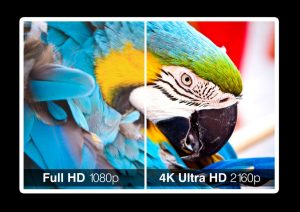
For those who know the specifications of current cables, let’s start with speed. 4k HDMI cable 2.0 dates back to 2013, and it is capable of transmitting 4K content at 60 fps (frames per second) – this means video at a resolution of 3840 x 2160, updated 60 times per second.

This high frame rate is usually used in 4K video games, as they have to follow a multitude of different objects, such as bullets or swift enemies. Most movies are made at 24 fps, and TV shows at 25 fps or 30 fps.

4k hdmi cable

Several years later, a small update, HDMI 2.0a, made the connection between TVs and players, transmitting HDR (High Dynamic Range) information as well. HDMI 2.0b appeared immediately after, supporting HLG (Hybrid Log Gamma) information. So far, this has been the highest standard for most consumers.

But the future of television looks even better than that. What is HDMI 2.1 doing? Essentially, the standard HDMI 2.1 cables can easily exceed the 4K limit, sending content at maximum 10K and 120 fps. All those extra pixels, 6 times more than a standard 4K, require a larger bandwidth to send the information. HDMI 2.1 completes this task, the upper limit being 48 Gigabits per second, instead of 18 Gbps.


Originally Posted here: What Kind of Cable do I need to Support 4k Resolution

Types of Video Connectors

vga cable port

Each type of video port, except VGA, is digital. The VGA cable port is analog, providing an image quality lower than that achieved through digital ports. The difference between digital and analog ports is at the resolution level and not at the image quality level; in other words, the image quality displayed at the 1920 × 1080 / 60Hz resolution through the HDMI port will look exactly the same when displayed through the DVI or Display port at the same resolution.

VGA port (Video Graphics Array)

VGA is one of the older connectors and it can only transmit analog signal, which can affect the image played on the new LCD monitors. VGA ports are found on older systems. Not all recently manufactured TVs, computers, monitors and laptops have a VGA port.

Digital Visual Interface (DVI) port

DVI is mainly used to connect monitors to computers. Televisions and laptops are not so often equipped with a DVI port. DVI plays digital signal, the image quality is very good, similar to the quality provided by the HDMI port. DVI cables usually do not carry sound (there are some exceptions)

High-Definition Multimedia Interface (HDMI) port

HDMI is used in a very wide range of electronics, being the most popular video port. The video signal can be transmitted over long distances without the need for a signal amplifier and it is possible to connect more monitors to a computer using a single cable.


First Seen on: Types of Video Connectors

What is the Difference Between Gold Plated and Regular HDMI Cables?

HDMI cables have different forms and connectors (from A to D) and here is some important information to understand more about the model and the best features.

HDMI type A

This type of HDMI cable is the most common. It is used to connect video game consoles, video game players, Blu-Ray etc.

HDMI type B

It was created in conjunction with the HDMI 1.0 standard from 2002. The model had more pins than the A-type and therefore offered higher resolution (3,840 x 2,400 pixels). At that time, it was intended to be a substitute for the old standard DVI-I, but it was not used commercially.

HDMI cable

HDMI type C

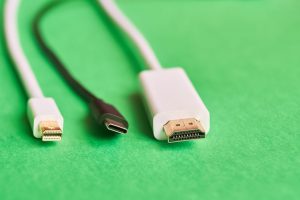
HDMI type C is better known as Mini HDMI cable and has the same functionality as type A, the only difference being the size: about 40% smaller. Mini HDMI has become very common in digital cameras, video cards and tablets.

HDMI type D

Because it is even smaller than the Mini HDMI (about 50% thinner), it is very common to find this connector in compact gadgets, such as action cameras and some smartphone models.

Besides these categories of regular HDMI cables, there is one more, which has nothing to do with the designs or size: gold plated HDMI cables. They sound precious and you may wonder about the difference between these cables and regular HDMI cables. Well, gold plated cables have no advantage except for their durability. Because gold is weather resistant, these cables are more suitable for outdoor use.

Originally Posted here: What is the Difference Between Gold Plated and Regular HDMI Cables?

What are Common AV Accessories?

HDMI cable

Analog cables

Category

  • RCA-RCA cables
  • XLR-XLR cables (balanced)
  • Mix RCA-XLR cables
  • Headphone cables
  • Phono Cables (Pick-Up)
  • DIN cables
  • Jack-Jack Cables
  • Jack-RCA cables
  • RCA Adapter Cables
  • Subwoofer Cables
  • Scart / Component cables
  • TV Receiver Cables
  • Analog Cables per Meter
  • Headshell, Tonearm Signal Cables

Digital cables

  • USB cables
  • Coaxial digital cables
  • AES-EBU cables (balanced)
  • Optical cables (Toslink)
  • BNC Digital Cables
  • Streaming Cables, Network
  • HDMI cables
  • HDMI  cable signal amplifier
  • Digital Cables per Meter

PRO cables

  • Microphone cables

Power cables

Category

  • Power cables
  • Power cables per meter
  • Power distributors
  • Power conditioners
  • DC / AC Power Supply
  • Fuses
  • Wall outlets
  • Schuko connectors
  • IEC connectors

Audio-Video adapters

Category

  • HDMI Adapters
  • Jack-Optic adapter s
  • Jack adapters 2.5 / 3.5 / 6.3mm
  • RCA / BNC / DIN adaptes
  • RCA / XLR Adapters
  • S-Video adapters

Audio-Video connectivity

  • RCA
  • XLR
  • RCA Socket
  • XLR Socket
  • Jack Socket
  • BNC
  • FROM
  • RJ-45 / CAT
  • Scart / VGA
  • Jack 2.5 mm / 3.5 mm / 6.3 mm

Wall connection

  • Cable accessories
  • Filters Cables
  • USB filters
  • Splitters / Retractable Tubes
  • Accessories Connection (Fludor)
  • Suspension AV cables

Speaker cables

Category

  • Pair speaker cables
  • Pair speaker cables Bi Wire
  • Pair speaker cables Bi Amp
  • Speaker cables per meter
  • Speaker cables reels
  • Jumper (Bi Wire Connection)

Speaker connection

Category

  • Banana
  • Spade
  • Speakon
  • Pin
  • Speaker terminals


Article Source over here: What are Common AV Accessories?

DSL vs. Cable Modem

Both Digital Subscriber Line (DSL) and cable modem services offer high-speed Internet access. Compared to traditional dial-up access, these two technologies open up homes and small businesses to a new realm of possibilities for network connectivity and applications. Video-on-demand, multimedia conferencing, and online gaming are just a few examples of services on the Net that don’t work so well at 56 Kbps.

DSL and cable modem differ in some fundamental ways. The two technologies can be compared and contrasted along these dimensions:

  • speed
  • cost
  • security
  • reliability and availability
  • usability and quality of service

Some of the differences between DSL and cable modem arise from the history of the technologies they are built on. Others originate with differences in the approach of service providers. In fact, the speed, cost, availability, and many other elements of DSL or cable modem service can vary significantly depending on the provider.

In terms of theoretical peak raw performance, cable modem generally wins the speed battle over DSL. Cable technology can, in theory, achieve networking speeds of approximately 30 Mbps (using a 100 Mbps network interface card), whereas most forms of DSL cannot reach 10 Mbps
In practice, though, the speed advantage of cable over DSL is much lower than might first be apparent. Both cable modem and DSL performance vary from one minute to the next depending on the pattern of use and traffic congestion on the Internet. This means that both services will rarely — if ever — reach peak performance.

Cable modem technology delivers shared bandwidth within the local neighborhood while DSL delivers dedicated local bandwidth. With cable, performance at any given time depends on how many cable subscribers in the neighborhood are currently actively using the network as well as load on the Internet generally. This “double whammy” suggests that cable modem will perform relatively slower during peak usage periods.

Summary
Cable modem retains a slight performance advantage over DSL but this advantage seems to be a short-term one. Most cable networks have not yet reached high enough subscriber levels to make the shared bandwidth issue critical. With technologies like dedicated-bandwidth VDSL, however, DSL threatens to erase cable’s speed advantage even before cable services become overcrowded.

CATV cables and adapters:

ADP7044 Video Balun BNCM – TERM 75 OHM
ADP7055 Video Balun BNCF – RJ45 75 OHM
LM0301-xxx RG59 Coax Cable TV Cable
LM0306-xxx RG6 Coax Cable TV Cable
M0311 RG59 Quick Coax Cable TV 6′
L0373 CATV F100 75 Ohm Terminator

Phone cables and adapters:

COM0006 Call Interrupt Eliminatr Cable
COM9225 ADSL DSL Filter
COM9927 2 Way Phone Separator
COM9928 Answering Machine Disconnect
L0502 Uncoiled Phone Handset Cord 7′
L0502xC-xxx Coiled Phone Handset Cord
L0504-xxx RJ11 4 Conductor Flat Crossed
Cable (For use with telephones and Modems)

L0505-xxx RJ11 4 Conductor Flat Straight Cable
L0506 RJ11 6 Cond. Flat Crossed 7′
L0507 RJ11 6 Cond. Flat Straight 7′
 L0524 RJ11 2 Pair Modular Crossed 7′
L0525 RJ11 2 Pr Modular Straight 7′
L0526 RJ11 3 Pair Modular Crossed 7′
L0527 RJ11 3 Pr Modular Straight 7′
L0530 RJ11 to RJ45 4 Cond Crossed 7′
L0531 RJ11 to RJ45 4 Cond Strait 7′
L0532 RJ11 to RJ45 6 Cond Crossed 7′
L0533 RJ11 to RJ45 6 Cond Strait 7′
L0540-50 RJ11 M-F Phone Extension 50′
L0541 5 Outlet Phone Splitter 15′

Originally Posted right here: DSL vs. Cable Modem

Design a site like this with WordPress.com
Get started